|
|
Curriculum Review – Administration Page |
Curriculum Review Page
For Curriculum Reviewers.
The Curriculum Review page is where your district’s reviewers approve or decline the activities teachers submit for HQIM approval.
Who can review
A reviewer needs both:
- the Curriculum Reviewer role (see Manage User Roles and Permissions), and
- a spot on at least one Curriculum Review team (see Create and Manage Teams).
With the role, you’ll see Curriculum Review under Administration. You only see submissions sent to a team you’re on.
Open the page
Go to Administration > Curriculum Review. A yellow number next to Administration and Curriculum Review shows how many activities are waiting for you.
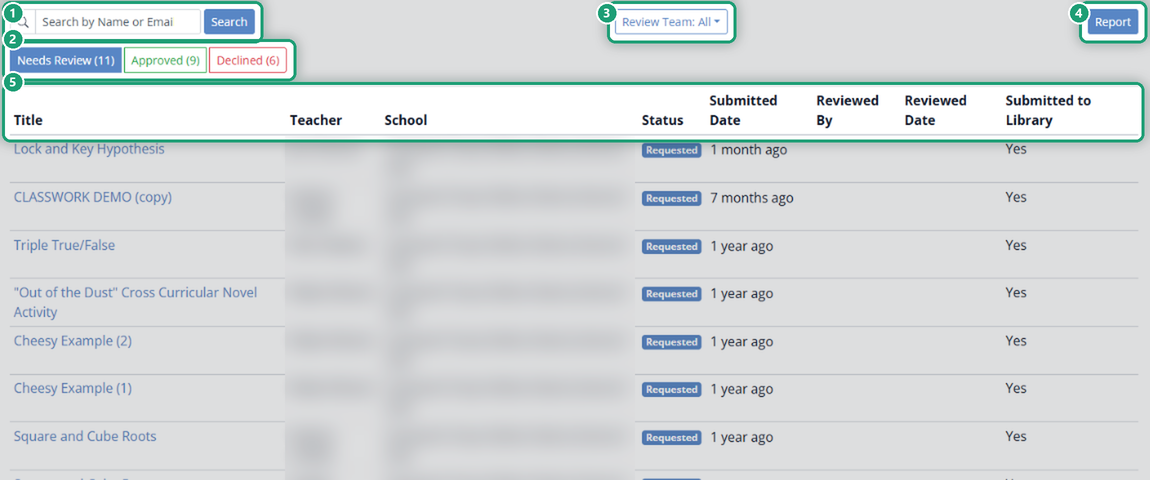
- Search: type a teacher’s name or email and click Search.
- Status tabs: Needs Review, Approved and Declined, each with its count.
- Review Team: show submissions for all your teams or just one.
- The list: Title, Teacher, School, Status, Submitted Date, Reviewed By, Reviewed Date, and Submitted to Library (whether the teacher asked for it to go to the district Shared Library once approved).
Review a submission
Click an activity’s title to open it. See Review Submitted Activities for HQIM.
How teachers submit: Submit an Activity for Approval.
Are you new to Classwork.com? Welcome!
Click here to start your 30 day risk-free PRO trial today.
Was this article helpful?
That’s Great!
Thank you for your feedback
Sorry! We couldn't be helpful
Thank you for your feedback
Feedback sent
We appreciate your effort and will try to fix the article