|
|
Submit an Activity for Approval – Activities Page |
Submit an Activity for Approval – Activities Page
When an activity is ready for district review, submit it for approval from your Activities page. Your district’s review team checks it against the Texas IMRA rubrics for high-quality instructional materials (HQIM). Approved activities can go to your district’s Shared Library for other teachers to use.
Open the approval window
- On the Activities page, check the box next to the activity. It can be a Flex or a Slide activity.
- In the bar that appears, click Approval (the star).

The Submit for Approval window opens.
Fill in the form
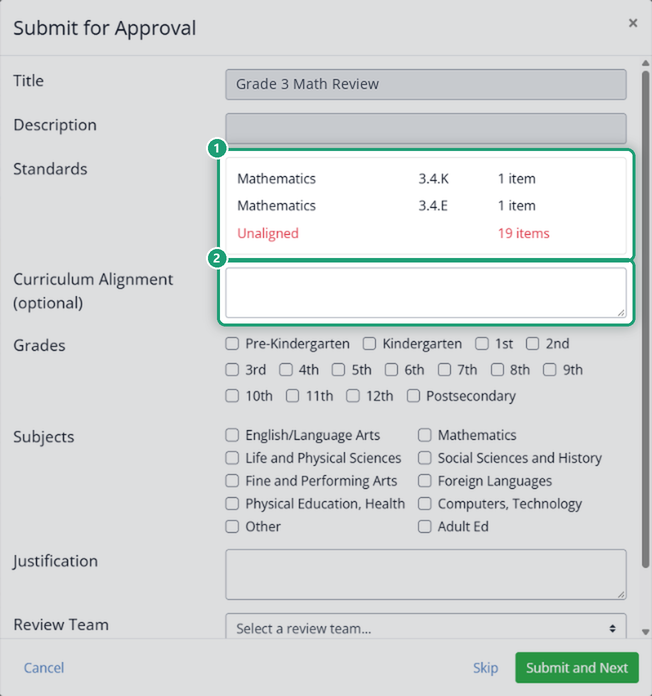
- Title and Description come from the activity and can’t be changed here. To change them, edit the activity first.
- Standards lists every standard tagged in the activity and how many items use it. Items with no standard show in red as Unaligned. You can still submit, but tagging every item first helps your reviewers.
- Curriculum Alignment (optional): note how the activity fits your district’s curriculum. Details here help reviewers move faster.
- Grades and Subjects: check all that apply.
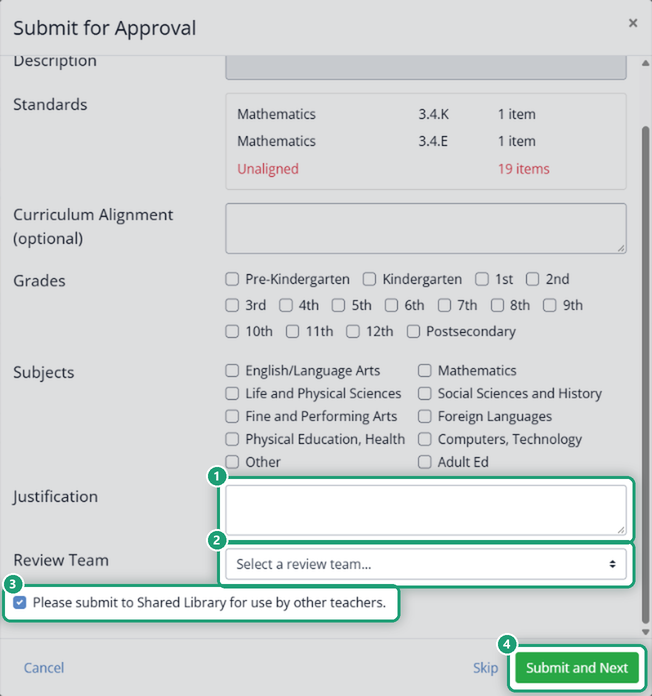
- Justification (required): explain the activity’s instructional purpose. Reviewers use it for HB 1605 IMRA compliance.
- Review Team: pick the district team that will review it.
- Please submit to Shared Library for use by other teachers is checked by default. Leave it checked if you want the approved activity shared with your district’s teachers.
Submit
Click Submit and Next to send the activity to the review team. Skip moves on without submitting it, and Cancel closes the window.
After you submit, the activity shows a Requested badge on your Activities page until the review team approves or declines it.
Was this article helpful?
That’s Great!
Thank you for your feedback
Sorry! We couldn't be helpful
Thank you for your feedback
Feedback sent
We appreciate your effort and will try to fix the article