|
|
Use AI to Generate Content |
Use AI to Generate Content
You can have AI generate passages and questions for you inside either editor:
- In the Slide Editor, click AI Create in the top toolbar.
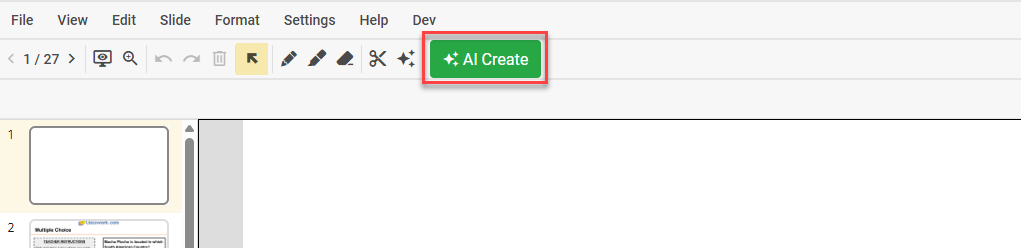
- In the Flex Editor, click + Add, then open the Create with AI tab.

Choose What to Create
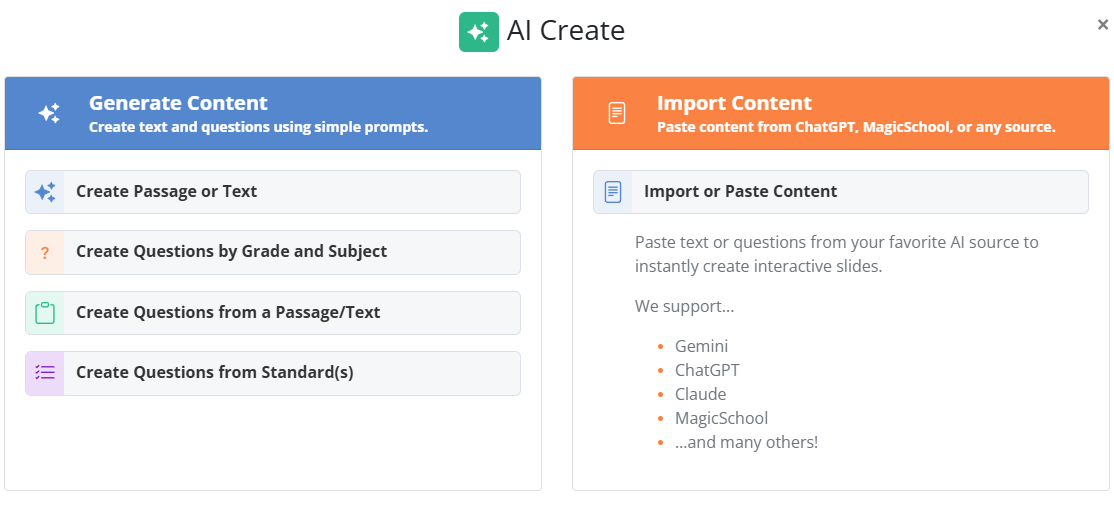
Create with AI can generate several kinds of content. Select the type you want:
- Generate original reading passages.
- Create questions by grade level and subject.
- Create questions from an existing passage.
- Create questions from academic standards.
- Import AI-generated content you created elsewhere (coming soon).
Example: Generate Questions from a Standard
- Choose Create Questions from Standards.
- Click Edit next to Learning Standards, then click Search Standards. Select your Course, Grade Level, and Standard, then click Save Changes. (International customers: Classwork.com recommends Common Core State Standards; email support@classwork.com to request your regional standards.)
- Choose the question types you want (for example, Multiple Choice or Fill in the Blank) and set the number of questions.
- Click Generate Questions.
- Click Add Questions to add them to your activity. Double-click any question to customize it.
Generate a Passage and Its Questions
When you generate a reading passage, Classwork asks if you want to generate questions for it. If you do, Classwork groups the passage with its questions and turns on Split Screen automatically, so the passage stays beside its questions with no manual grouping. (See Split Screen in the Flex Editor.)
Review Before You Assign
Always review AI-generated content for accuracy before assigning it to students. AI can make mistakes, so check the questions, the answer keys, and any generated passage before students see them.
Related Articles
Was this article helpful?
That’s Great!
Thank you for your feedback
Sorry! We couldn't be helpful
Thank you for your feedback
Feedback sent
We appreciate your effort and will try to fix the article