|
|
Compose New Activity |
Compose New Activity
Applies to: Flex Editor & Slide Editor
Starting from scratch? Compose New Activity opens a blank Activity in the Flex Editor, ready for text, images, audio, video and auto-scored questions. You can also write content with AI or pull questions from an item bank. Prefer the Slide Editor? See Start a blank Slide activity instead.
Start a blank Flex activity
- On your Activities page, click + New File.
- Click Compose New Activity. A new, empty Activity opens in the Flex Editor.
- Click the pencil next to Untitled Activity and give it a name.
- Click + Add to add your first item.
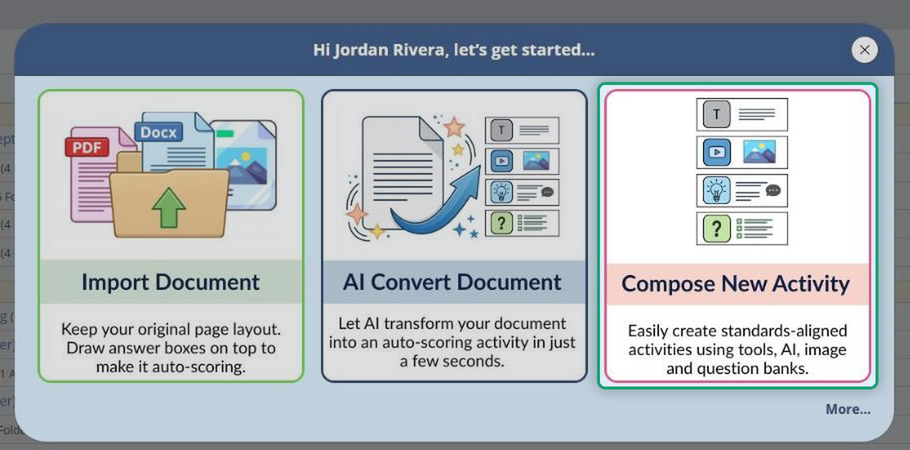
To find your way around, see the Flex Editor Overview. To start building, see Adding Items (Flex Editor).
Start a blank Slide activity instead
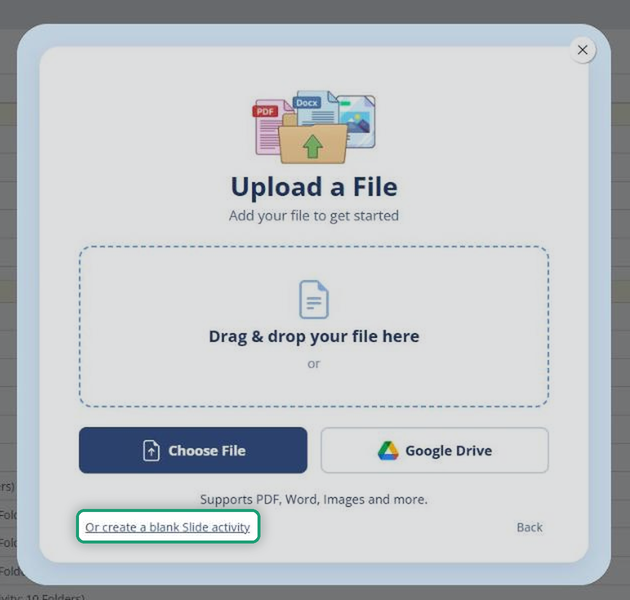
If you’d rather build in the Slide Editor (where you draw answer boxes on a page), there are two ways to start a blank Slide activity:
- In a brand-new Flex activity, click Click to change to a Slide activity in the yellow banner at the top of the editor.
- From + New File, choose Import Document, then click Or create a blank Slide activity at the bottom of the Upload a File window.
Related articles
Are you new to Classwork.com? Welcome!
Click here to start your 30 day risk-free PRO trial today.
Was this article helpful?
That’s Great!
Thank you for your feedback
Sorry! We couldn't be helpful
Thank you for your feedback
Feedback sent
We appreciate your effort and will try to fix the article