|
|
Schoology: Fixing a "We were unable to locate an external tool" error |
Fix the Schoology “Unable to Locate an External Tool” Error
You may see this error when you or a student clicks a Classwork.com Assignment in Schoology:
We were unable to locate an external tool for the specified tool link. Please make sure this provider is configured: External Tool Configuration.
It means Schoology couldn’t match the Assignment link you pasted to any External Tool installed in your school. Check these causes in order, most common first. The first two are fixed by your Schoology administrator in the Classwork.com External Tool settings.
1. The tool matches by URL instead of Domain
In the Classwork.com External Tool settings, Match By must be Domain. If it says URL, change it to Domain, save, and click the Assignment again.

2. The domain is entered incorrectly
The Domain/URL must be exactly https://app.classwork.com, with no slash at the end.

3. The Assignment link was copied incompletely
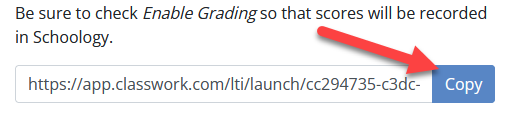
On the Classwork.com Assignment, use the Copy button to copy the whole link, then paste it into the Schoology External Tool again. Typing or selecting the link by hand often leaves part of it off.
Links from before July 2025
In July 2025 the app’s address changed from app.teachermade.com to app.classwork.com. If your course still has older app.teachermade.com links and you’re adding new app.classwork.com links, Schoology needs both tools installed. Leave the TeacherMade tool installed and ask your administrator to also install the tool as Classwork.com. Send them Schoology: Handling the name change to Classwork.com and Schoology: How do I Set up Classwork.com as an External Tool?
Still seeing an error?
If students see Forbidden 403 instead, see How Do I Fix a “Forbidden 403” Message in Schoology? For anything else, email support@classwork.com.
Was this article helpful?
That’s Great!
Thank you for your feedback
Sorry! We couldn't be helpful
Thank you for your feedback
Feedback sent
We appreciate your effort and will try to fix the article