|
|
How Do I Give Authorization to Classwork.com to Access My Google Classroom? |
Connect Classwork.com to Google Classroom
If you see this screen when trying to create an Assignment through Google Classroom, it means you have not yet given Classwork.com permission to connect with Google Classroom.
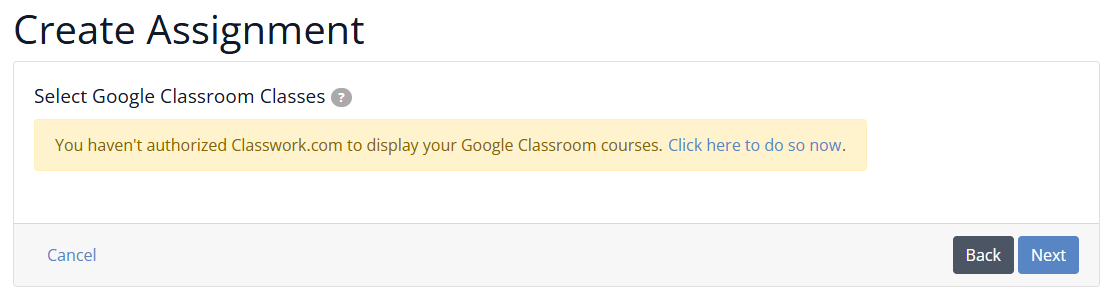
You only need to complete this authorization process once, the first time you connect Classwork.com to Google Classroom.
Authorize Google Classroom Access
- Locate the blue text that says click here to provide necessary authorization... and select it.
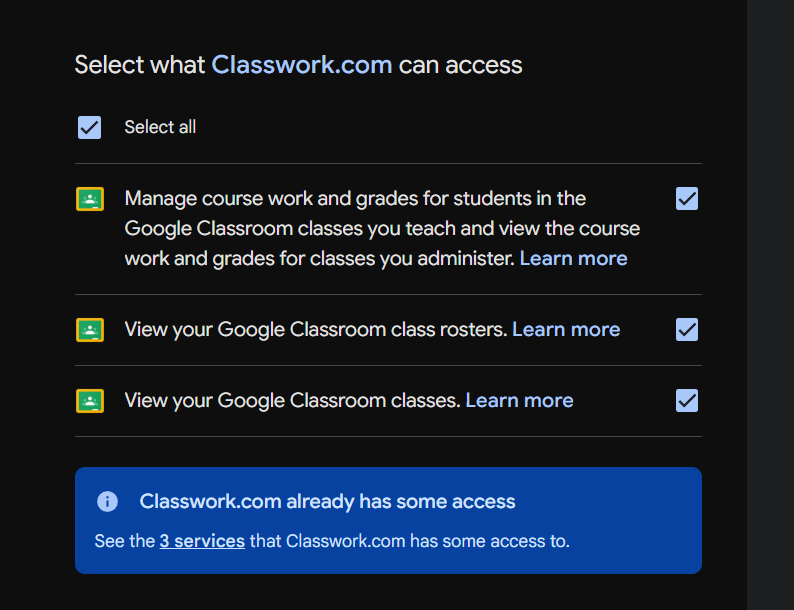
- A Google pop-up window will appear asking you to allow Classwork.com to access your Google Classroom data.
- Grant all requested permissions. You can select each permission individually or use the option to allow all.
- Click Continue at the bottom of the window.
Return to Create Assignment
After authorization is complete, you will return to Step 2 of the Create Assignment process in Classwork.com.
You should now see your Google Classroom courses available to import and assign.
Are you new to Classwork.com? Welcome!
Click here to start your 30 day risk-free PRO trial today.
Was this article helpful?
That’s Great!
Thank you for your feedback
Sorry! We couldn't be helpful
Thank you for your feedback
Feedback sent
We appreciate your effort and will try to fix the article