|
|
Is it possible to add activities or subfolders to folders? |
Can I Add Activities or Subfolders to a Folder?
Yes. Open the folder first, then create what you need inside it. Anything you create while a folder is open goes into that folder.
Create a subfolder
- On your Activities page, click the folder to open it.
- Click New Folder.
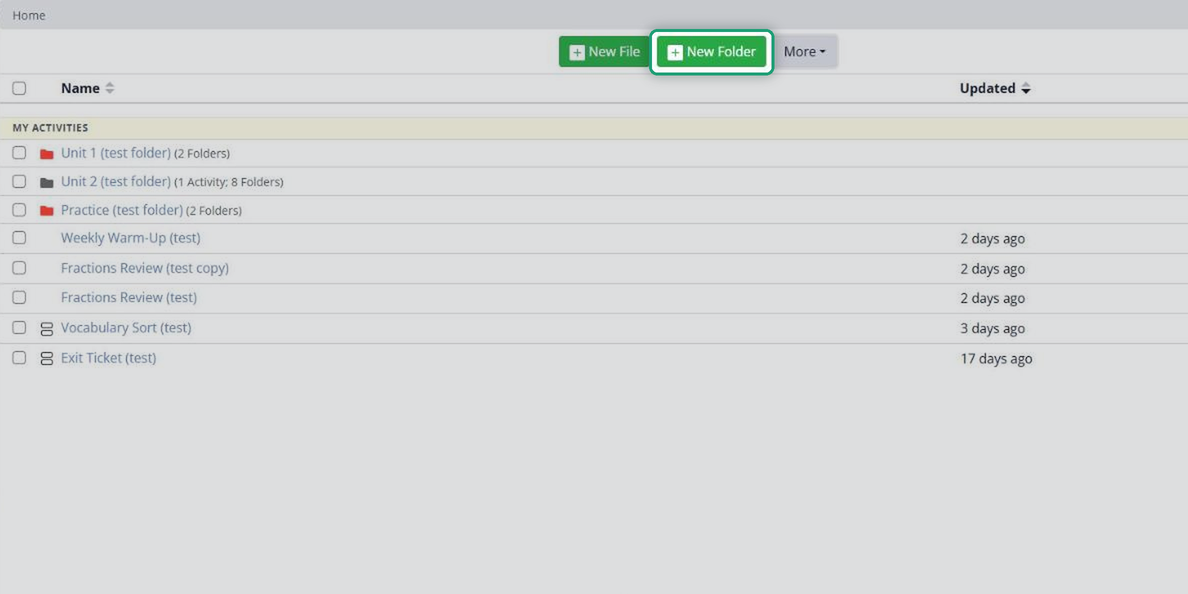
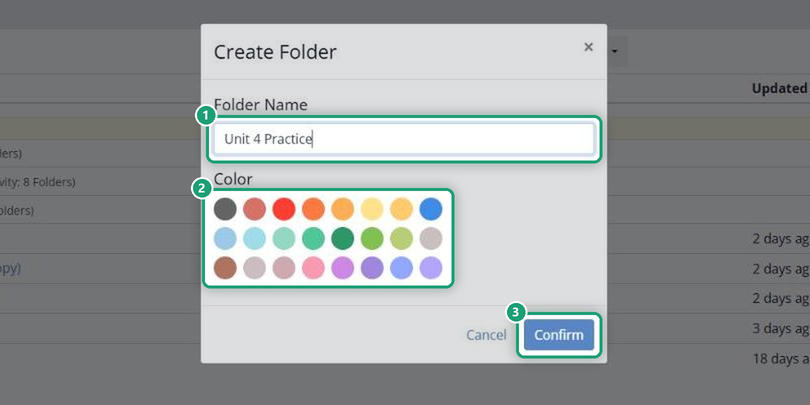
- Type the Folder Name, pick a Color, and click Confirm.
Create a new Activity in a folder
- Open the folder.
- Click + New File and choose Import Document, AI Convert Document or Compose New Activity.
- Build your Activity as usual. It’s saved in the folder you had open.
Put Activities you already have into a folder
- Check the box next to each Activity (or folder) you want to move.
- Click Move on the yellow Activity Menu bar.
- Choose the destination folder (click Expand next to Home to see your folders), then click Confirm.
Import shared Activities into a folder
- Open the folder.
- Click More → Import Shared Activities.
- Paste the sharing links or sharing text, then click Import from sharing text.
See Import Shared Activities for details.
Are you new to Classwork.com? Welcome!
Click here to start your 30 day risk-free PRO trial today.
Was this article helpful?
That’s Great!
Thank you for your feedback
Sorry! We couldn't be helpful
Thank you for your feedback
Feedback sent
We appreciate your effort and will try to fix the article