|
|
Using the Inline Drag and Drop Question Type |
Using the Inline Drag and Drop Question Type
Inline Drag and Drop gives students a bank of words (or math) to drag into the blanks of a sentence or passage. Classwork.com scores it for you. Use it for vocabulary in context, completing a rule or definition, or filling in the steps of a process.
Looking for labeling or sorting on a page, like the parts of a plant? That’s Drag and Drop, in the Slide Editor.
Add the Question
- Flex Editor: Click + Add, then on the Add Item tab, click Inline Drag and Drop.
- Slide Editor: In the Tool Box, click Authoring, then Inline Drag and Drop. Click on the slide, or click and drag to size it.

The Edit Inline Drag-and-Drop window opens with a finished sample (“Twinkle, twinkle, little ___”) so you can see how it works. Replace the sample with your own question.
Build It
- Write the question. Type your directions and the sentence or passage in the text box. Delete the sample text.
- Add the blanks. Click where a blank goes, then click Add Drop Area. Repeat for each blank.
- Add the answer choices. Under Edit Answers, type each choice. Click Add Answer for another one. Click T for text or x² for a math expression. Add extra choices that don’t belong in any blank to make it harder.
- Set the correct answers. Drag each correct choice from the answer bank into its blank.
- Click Save.
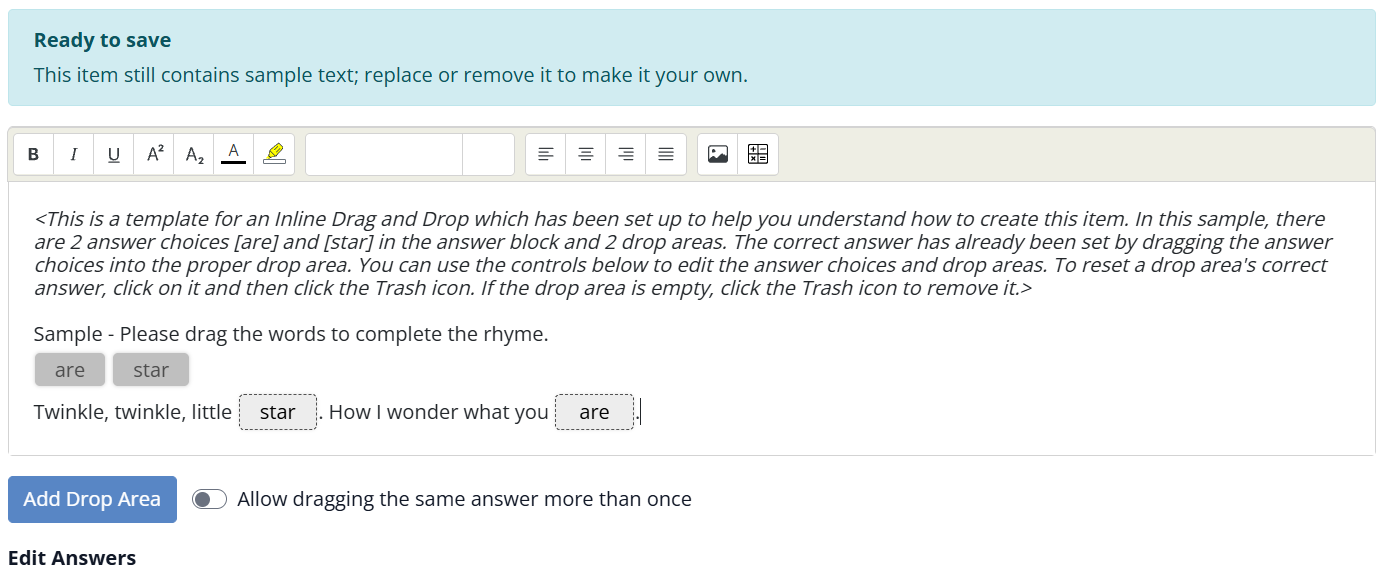
To change a blank’s correct answer, click the blank and then the trash icon. Click the trash icon on an empty blank to remove it. To delete an answer choice, click the trash icon next to it under Edit Answers.
Use an Answer More Than Once
Each choice can go in one blank. If the same word belongs in more than one blank, turn on Allow dragging the same answer more than once.
Points
The whole question has one point value (1 point to start), and students earn it by getting every blank right. In the Flex Editor, click the points button at the top of the item to change it. In the Slide Editor, select the question and change Points in the toolbar.
What Students See
Students drag each choice from the answer bank into a blank. After they submit, you can see their answers and the correct ones when you review their work.
Drag and Drop or Inline Drag and Drop?
| Inline Drag and Drop | Drag and Drop | |
|---|---|---|
| Students drag | Words or math into blanks in a sentence | Words or pictures onto spots on the page |
| Good for | Vocabulary in context, completing sentences | Labeling diagrams, sorting into groups |
| Editors | Flex Editor and Slide Editor | Slide Editor (coming soon to Flex) |
| Points | One value for the whole question | 1 point per item, by default |
See Using the Drag and Drop Question Type for Drop Zones.
Was this article helpful?
That’s Great!
Thank you for your feedback
Sorry! We couldn't be helpful
Thank you for your feedback
Feedback sent
We appreciate your effort and will try to fix the article