|
|
Viewing Your Observations and Action Steps |
Viewing Your Observations and Action Steps
The Observations tab is where you review the feedback from your instructional coaches – your most recent observation, your current action step, and the microsteps to work on next. It’s for reviewing only; your coach or administrator creates the observations.
Your Most Recent Observation
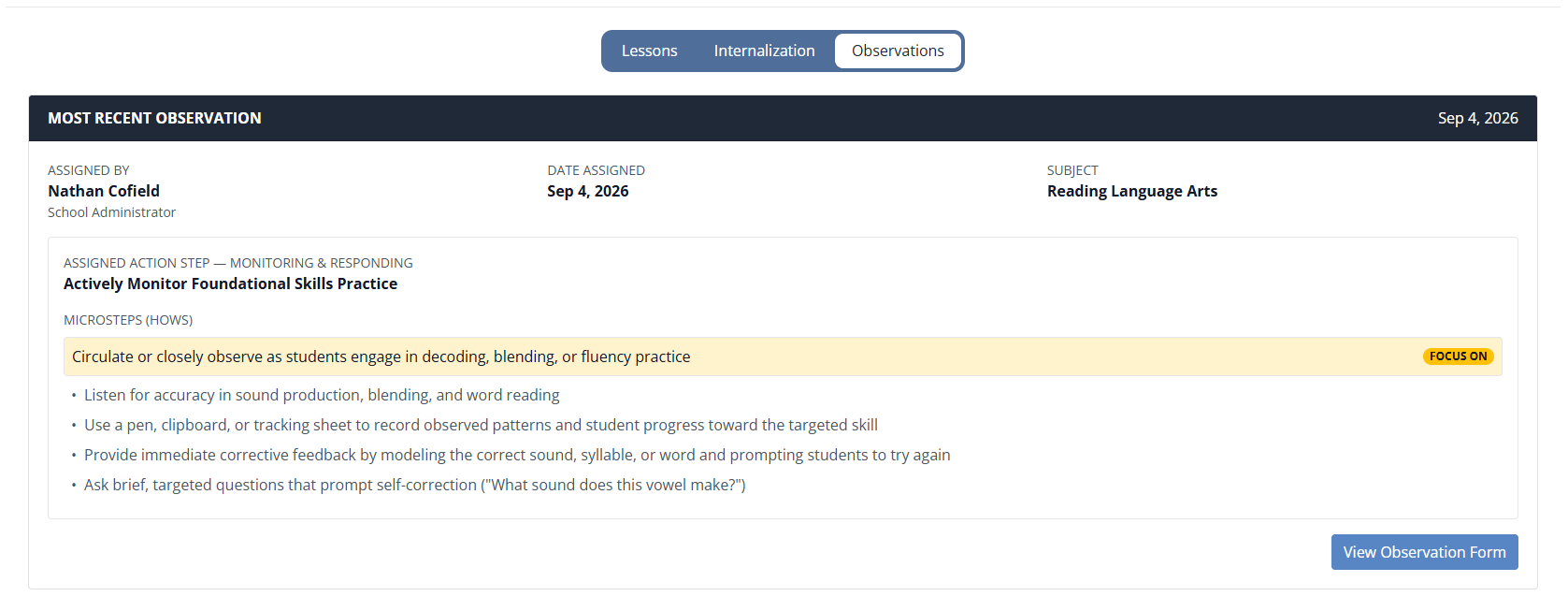
At the top, you’ll see your latest observation, including:
- who assigned it (your coach or administrator) and the date
- the class it’s tied to
- your Assigned Action Step and its focus area (for example, Learning Environment)
- the Microsteps – the “hows” that break the action step into concrete moves – with one highlighted as your Focus On
These action steps follow the Get Better Faster coaching model (Bambrick-Santoyo) and your district’s LIFT grant guidance. To open the full observation, click View Observation Form.
Previous Observations
Below your most recent observation, the Previous Observations list shows your history – the date each was assigned, when you completed the action step, your coach, the assigned action step, and a link to View each form.
Who Creates Observations
Observations are created by your district’s coaches and providers. On your side, this tab is for reviewing your feedback and working on your current action step – there’s nothing for you to fill in here.
Was this article helpful?
That’s Great!
Thank you for your feedback
Sorry! We couldn't be helpful
Thank you for your feedback
Feedback sent
We appreciate your effort and will try to fix the article