|
|
Using the Lessons Tab |
Using the Lessons Tab
The Lessons tab is where you record each lesson as you teach it. Your classes appear as columns, organized into their Modules, Topics, Units, and Lessons, so you can log a lesson in just a couple of clicks.
Logging matters for a few reasons: it feeds your pacing report, it checks the compliance boxes for the LIFT grant, and – on the long form – it builds a daily habit of reflection.
Log a Lesson
On the Lessons tab, find the class column and period, then click the green + next to the lesson you taught. The log form opens. As you go, each lesson shows its status – In Progress while a log is started, and a checkmark once it’s submitted.
Short Form or Long Form?
Your district decides which form you use.
Short Form
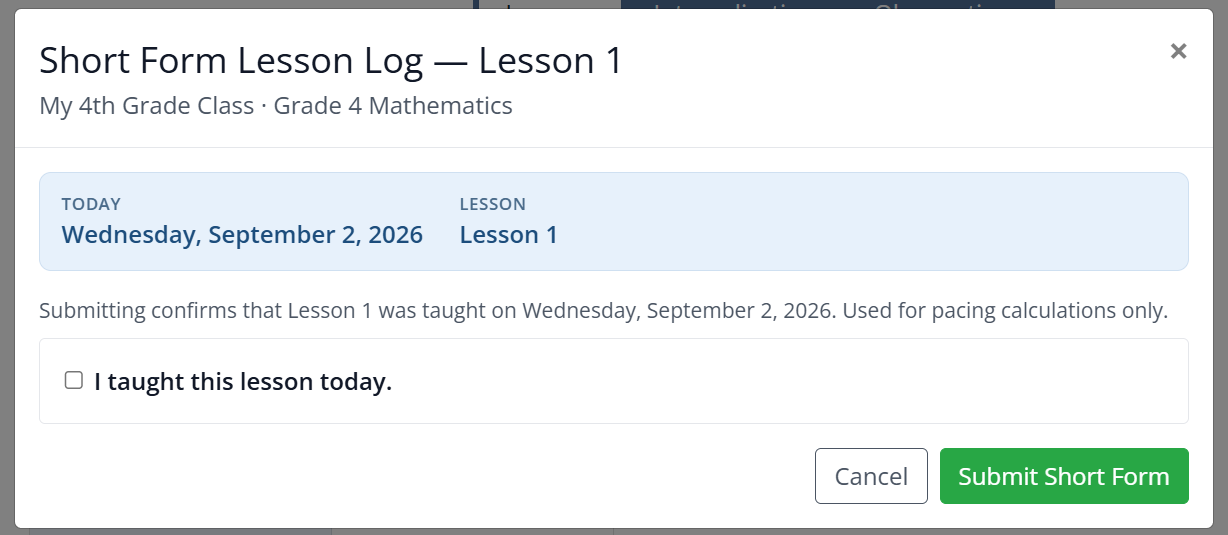
The short form simply confirms you taught the lesson. Check I taught this lesson today and click Submit Short Form. It’s used for pacing calculations only.
Long Form
The long form is a quick, guided reflection – about a minute – organized into three categories.
- Category 1: Curriculum Fidelity – check which lesson components you taught (Fluency Practice, Application Problem, Concept Development, Independent Problem Set, Student Debrief), how you checked for understanding, and – if you left a component out – the reason why.
- Category 2: Heavy Lifting & Environment – note your instructional look-fors and the scaffolds you provided (the Planned supports carry over from your Internalization log), who did the “heavy lifting” during the core task, and the student engagement level.
- Category 3: Next Steps & Support – enter the class mastery from your Classwork digital assessment, choose your next step (Full Steam Ahead, Loop & Small Group, or Reteach Needed), and say whether you need support from a coach or administrator.
When you’re finished, click Submit Lesson Log.
Reading and Foundation Skills (Grades K–3)
For RLA in Grades K–3, you’ll see two logs each day – one for Reading and one for Foundation Skills. Complete both to keep your pacing accurate.
Tailored to Your Course
The Math, Reading, and Foundation Skills logs are each tuned to that course, so the components and look-fors match what you actually teach.
Was this article helpful?
That’s Great!
Thank you for your feedback
Sorry! We couldn't be helpful
Thank you for your feedback
Feedback sent
We appreciate your effort and will try to fix the article