|
|
Review Tab - Classes Page |
Review Tab - Classes Page
The Review tab is where you grade and return student work. At the top, it shows the total number of submissions that need your review, for the selected class (or all classes) within your date range.
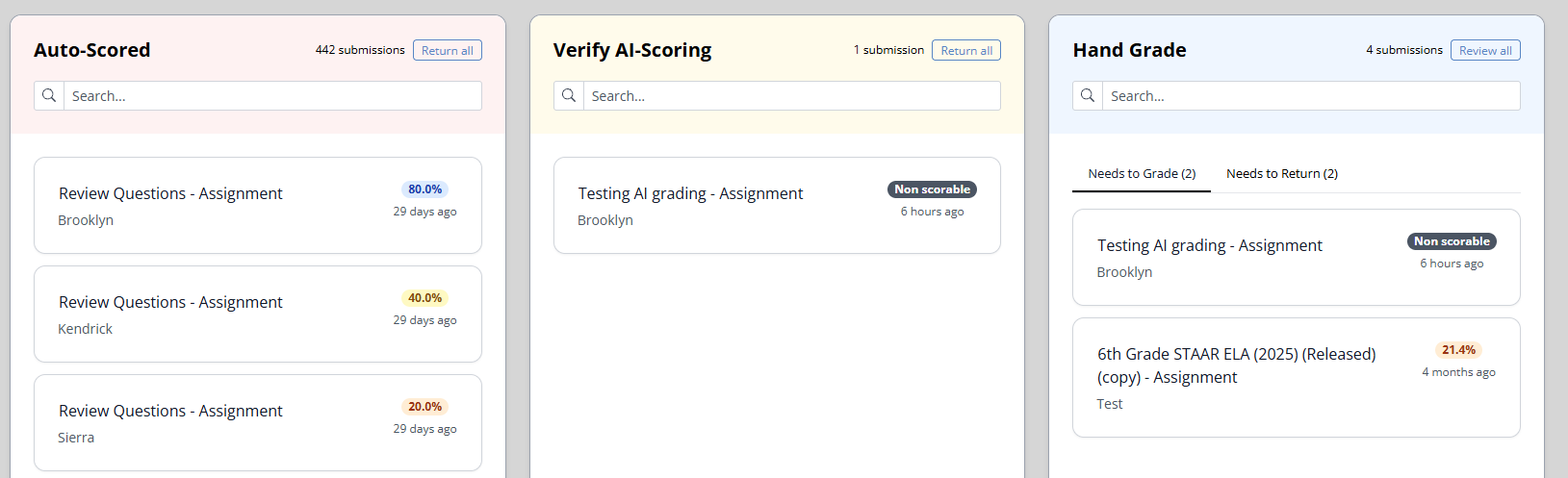
Review is organized into three sections, based on how each submission is scored: Auto-Scored, Verify AI-Scoring, and Hand Grade.
How to Get to the Review Tab
- Open the Classes page from the left navigation panel.
- Select a class, or click All Classes (top right) to include every class.
- Choose the Review tab.
Auto-Scored
The Auto-Scored section holds submissions where every question was scored automatically by Classwork, with no constructed-response questions to grade. These are ready to go.
Use the Return all button to return all submitted work in this section to students at once.
Verify AI-Scoring
The Verify AI-Scoring section holds assignments that include an Open Answer (constructed response) question that was scored by AI. Here you can review and adjust the AI's scoring before it goes back to students.
We always recommend double-checking AI scoring. It is a powerful head start, but it is not perfect.
Once you are satisfied, use the Return all button to return all submitted work in this section.
Hand Grade
The Hand Grade section holds submissions with an Open Answer (constructed response) question where AI Scoring was not enabled. These need to be graded by hand.
Hand Grade is split into two tabs:
- Needs to Grade: Submissions still waiting to be graded. This tab shows a Review all button so you can work through them.
- Needs to Return: Submissions you have graded but not yet returned. This tab shows a Return all button to send them back to students.
Each tab includes a live count, for example Needs to Grade (5).
Submissions in More Than One Section
Some assignments contain both AI-scored and hand-graded responses. When that happens, a student's submission appears in more than one section, so you complete each part in its matching bucket.
Related Articles
Was this article helpful?
That’s Great!
Thank you for your feedback
Sorry! We couldn't be helpful
Thank you for your feedback
Feedback sent
We appreciate your effort and will try to fix the article