|
|
Merge Duplicate Students |
Merge Duplicate Students
Duplicate student records can occur when students submit work using different sign-in methods, such as Name or ID for one assignment and an email address for another. The Merge Students tool lets you combine those records into a single student account while preserving all work and enrollments.
How to Access the Students Tab
- From the left-hand menu, click Classes.
- At the top left of the Classes page, click the gear icon next to Classes.
- The Setup Classes and Students screen opens.
- Click the Students tab at the top of the page.
This view shows all students associated with your account.

When You Can Merge Students
The Merge Students option becomes available when:
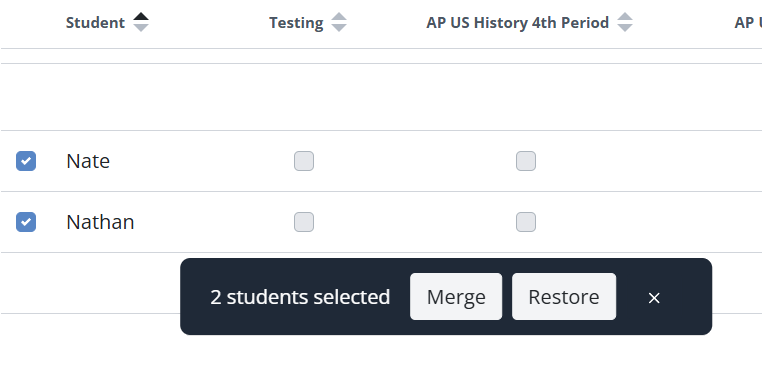
- You select two or more students using the checkbox to the left of their names.
- All selected students appear in the Students table, whether they are in Enrolled, Other, or Archived.
If only one student is selected, you will see the Archive option instead.
How to Merge Duplicate Students
- In the Students tab, locate the duplicate student records.
- Select two or more students using the checkbox next to each name.
- At the bottom of the screen, click Merge Students.
A confirmation window opens showing the selected students.
- Choose the student account you want to keep using the bubble selector.
- Review the warning message:
- All class enrollments from the other selected students will be merged into the selected student.
- Duplicate student records will be removed.
- This action cannot be undone.
- Click the blue Merge Students button to complete the process.

What Happens After a Merge
After merging:
- All class enrollments are combined into the selected student account.
- All submissions, grades, and feedback are preserved.
- Duplicate student records are removed from your list.
- No student work is lost.
The merged student will now appear as a single record in your Students tab.
Important Notes
- Merging students cannot be undone.
- This process does not affect Google Classroom enrollment.
- Merging is especially helpful when a student submitted work using Name or ID before later signing in with an email address.
Related Key Terms: merge students, duplicate students, merge duplicate student records, name or ID sign in, student email sign in, combine student accounts, remove duplicate student entries, merge enrollments, preserve submissions, consolidate student records
Was this article helpful?
That’s Great!
Thank you for your feedback
Sorry! We couldn't be helpful
Thank you for your feedback
Feedback sent
We appreciate your effort and will try to fix the article