|
|
Can I Create a Number Line With Fractions in Classwork.com? |
Can I Create a Number Line With Fractions?
Not with fraction intervals yet. The Number Line works with whole numbers and decimals, so use the decimal equivalent of each fraction.
Use decimal equivalents
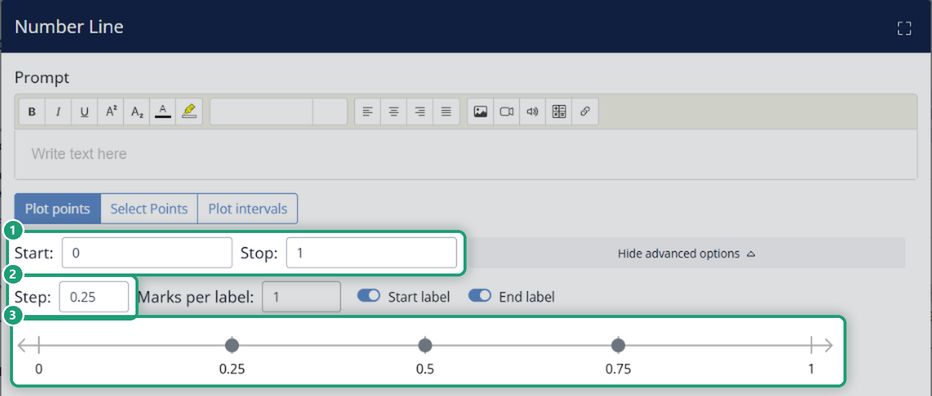
Set the number line’s Start, Stop and Step with decimals (Step is under Show advanced options). The boxes only take numbers: typing 1/4 doesn’t work. For example:
- 1/2 as 0.5
- 1/4 as 0.25
- 3/4 as 0.75
You’ll find the Number Line under + Add > Add Item > Math in the Flex Editor, and in the Tool Box on the Math tab in the Slide Editor.
With Start 0, Stop 1 and Step 0.25, the line is marked at 0.25, 0.5 and 0.75. Click a mark to plot a correct point.
Need students to answer with a fraction?
Use a Numeric item in the Flex Editor, which accepts fractions (2/5) and mixed numbers (5 2/5), or the Fraction tool on the Slide Editor’s Math tab.
Suggest it
If fraction intervals would help your teaching, email support@classwork.com to share your suggestion.
Was this article helpful?
That’s Great!
Thank you for your feedback
Sorry! We couldn't be helpful
Thank you for your feedback
Feedback sent
We appreciate your effort and will try to fix the article