|
|
Submit an Activity for Approval – Activities Page |
Submit an Activity for Approval – Activities Page
When an activity is ready for district-level review, you can submit it for HQIM approval directly from the Activities Page.
1. Open the Approval Window
- Go to the Activities Page.
- Check the box next to the activity.
- Select Approval (star icon) from the Activity menu.
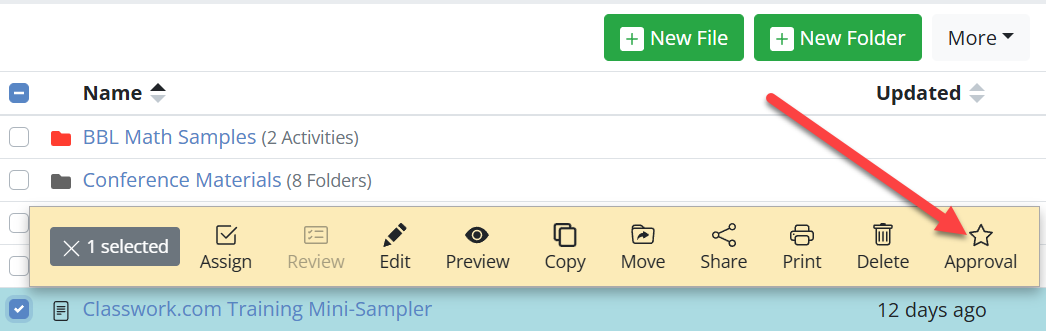
The Submit for Approval window will open.
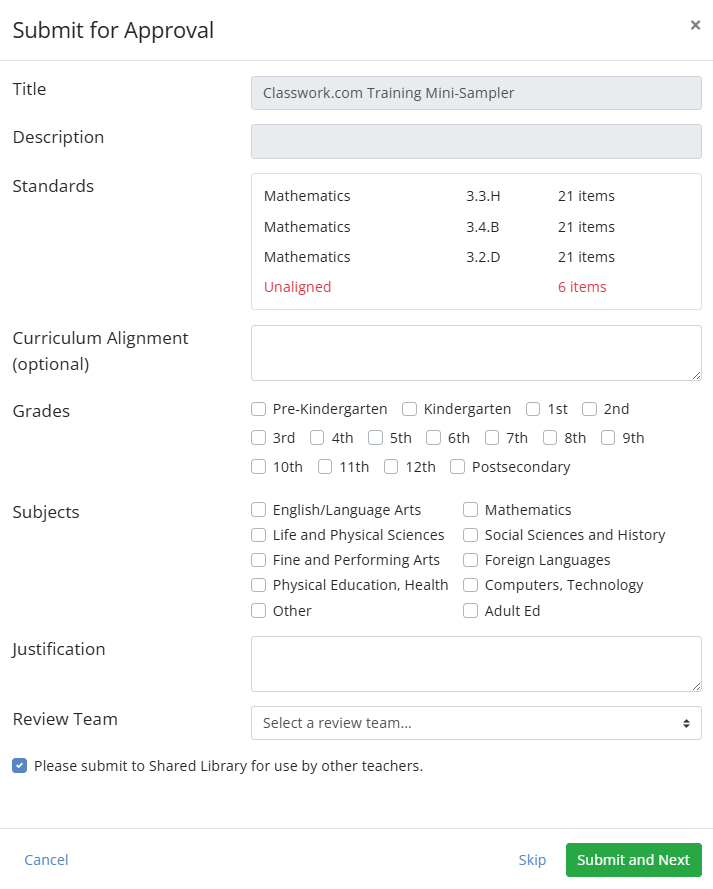
2. Complete the Approval Form
Some fields are read-only. Others require your input.
| Field | What to Know |
|---|---|
| Title & Description | Pre-filled and locked. Edit them on the activity before opening this window. |
| Standards | Shows all tagged standards. Unaligned questions appear in red. |
| Curriculum Alignment | Optional. Identify district curriculum alignment. |
| Grades & Subjects | Select all applicable options. |
| Justification | Explain instructional purpose. Required for TEA HB 1605 IMRA compliance. |
| Review Team | Select the district team that will evaluate the activity. |
| Shared Library | Checked by default. Approved activities will appear in the district Shared Library. |
3. Submit
- Click Submit and Next to send the activity to the selected review team.
- Continue submitting additional activities or close the window.
Key Notes
- Standards: Tag all questions before submitting. Unaligned questions appear in red but can still be submitted.
- Curriculum Alignment: Adding details helps reviewers process submissions faster.
- Shared Library: Approved activities become reusable district HQIM resources.
Are you new to Classwork.com? Welcome!
Click here to start your 30 day risk-free PRO trial today.
Was this article helpful?
That’s Great!
Thank you for your feedback
Sorry! We couldn't be helpful
Thank you for your feedback
Feedback sent
We appreciate your effort and will try to fix the article