|
|
How to Add Texas OER Materials to Your Account |
How to Add Texas OER Math and RLA Materials to Your Account
If your school or district uses Classwork.com and you want to add the Texas OER curriculum – Bluebonnet™ Learning Math and Bluebonnet™ Learning RLA – to your account, follow these steps. You can add Math, RLA, or both.
Add a Grade Level
Click the Add Texas OER Curriculum button at the top of the screen.

In the window that opens, the Texas OER curriculum is grouped under a Math heading and an RLA heading. Select the subject and grade you want – for example, Texas OER Math Grade 5 – then click Add.
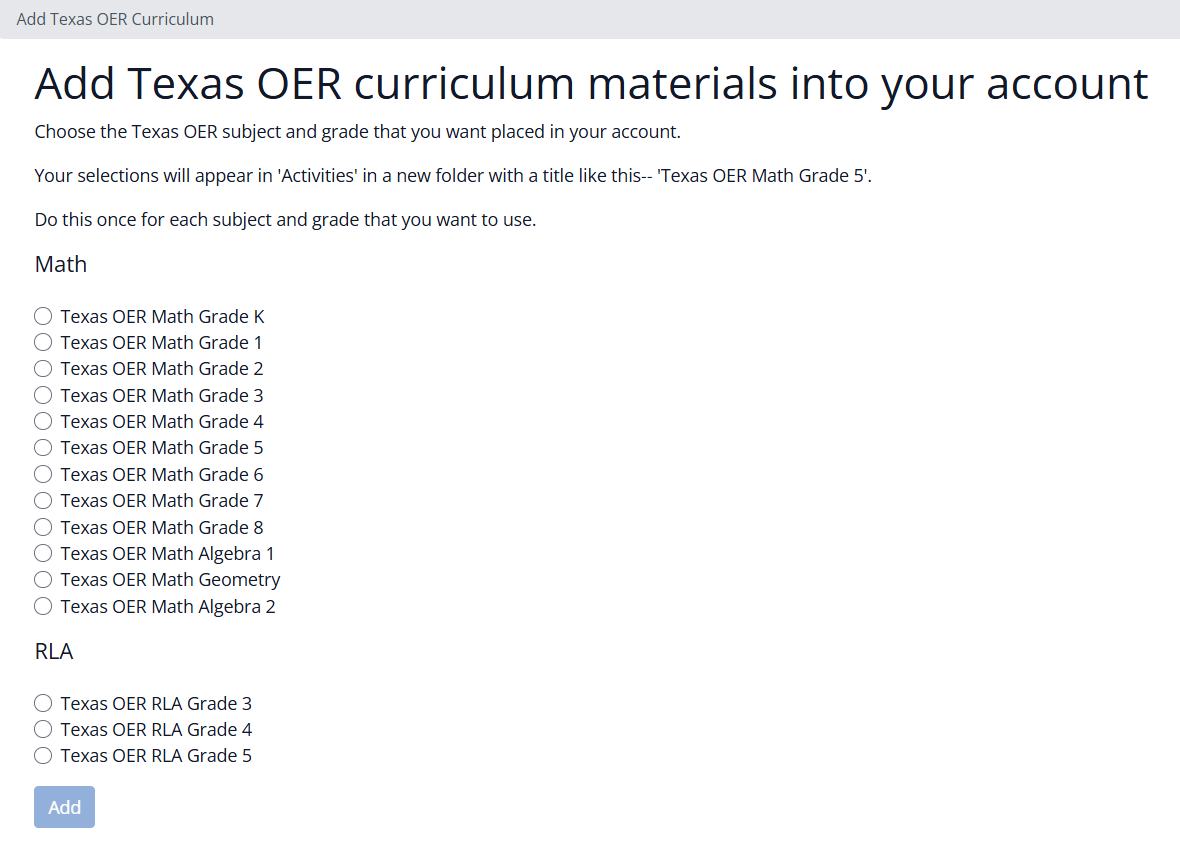
A few things to know:
- You can add only one grade level at a time.
- Each time you add a grade level, Classwork.com creates a copy of those materials in your account.
- Repeat this process to add more grade levels, or the other subject, one at a time.
Find the New Materials
After the curriculum is added, your selection appears in your Activities view as a new folder named for that subject and grade, like Texas OER Math Grade 5.

Open a folder to find the ready-made activities for that grade, and assign them to your students whenever you’re ready.
Was this article helpful?
That’s Great!
Thank you for your feedback
Sorry! We couldn't be helpful
Thank you for your feedback
Feedback sent
We appreciate your effort and will try to fix the article