|
|
Can I Change the Background Color of My Question? |
Can I Change the Background Color of My Question?
Applies to: Flex Editor & Slide Editor
Yes, in a Flex Activity. Use Style to give any question a background color, a border and a font. In a Slide Activity, most question types can’t have a background color, but you can change their font color and border color.
Flex Editor
- Click the … menu at the top right of the question and choose Style.
- Turn on Background and pick a color, or set your own under Custom.
- If you like, turn on Border and change the Font and Size.
- Click OK.
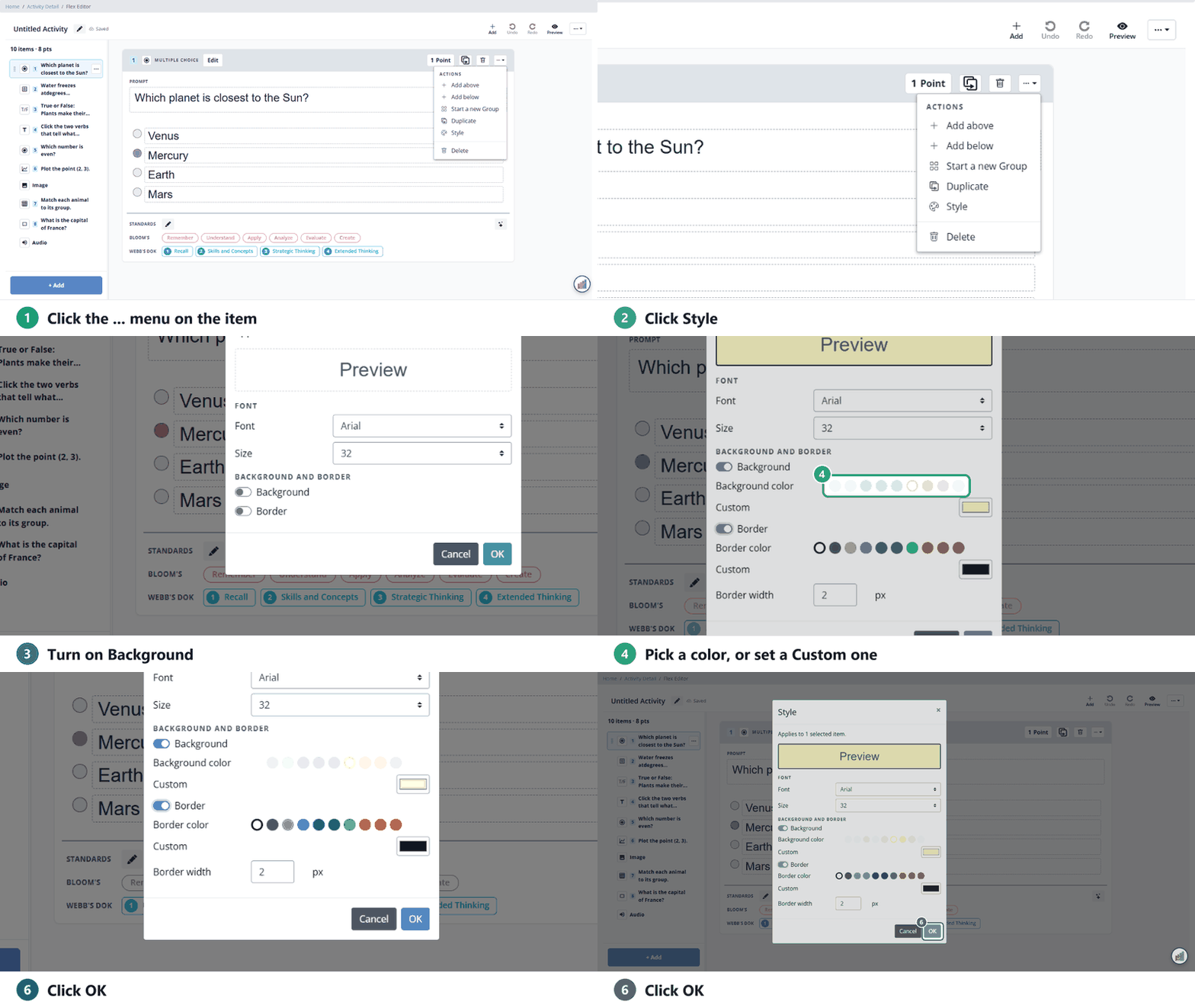
To color several questions, or all of them, at once, select them first (Shift+click in the item list, or Select All), then click Style. See Changing the Background Color.
Slide Editor
Select the question and use the toolbar to change its font color and border color. To color the whole slide behind it, use Slide → Set Background Color (see Changing the Background Color).
Are you new to Classwork.com? Welcome!
Click here to start your 30 day risk-free PRO trial today.
Was this article helpful?
That’s Great!
Thank you for your feedback
Sorry! We couldn't be helpful
Thank you for your feedback
Feedback sent
We appreciate your effort and will try to fix the article