|
|
Where do I go for Help or Support? |
Where Do I Go for Help or Support?
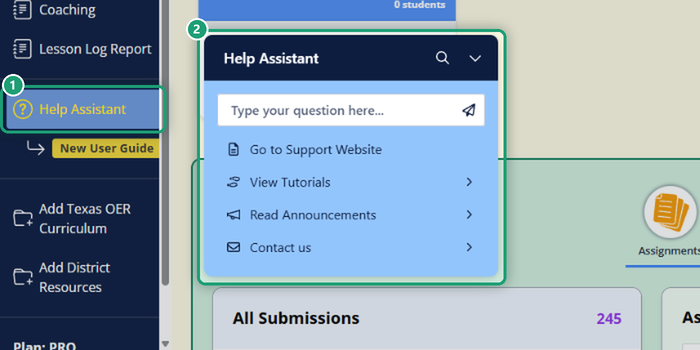
Click Help Assistant in the left menu of Classwork.com. From there you can ask a question and get an instant answer, open the Help Center, take a guided tutorial, read announcements or contact our team.
Ask a question
Type your question in the Help AssistantType your question in the box at the top of the Help Assistant and pressrsquo;s question box and press Enter. Our AI chatbot answers right away, day or night. It’s trained on our Help Center articles, and our team reviews and retrains it regularly.
- Ask a full question (“How do I assign an Activity in Canvas?”) rather than one word (“canvas”).
- Ask follow-up questions to narrow the answer, or start a new chat for a new topic.
- Each answer ends with links to related articles and a way to reach a person.
Go to Support Website
Opens this Help Center, with every article about using Classwork.com.
View Tutorials
Pick a title to take a guided tour inside the app. Each tutorial walks you through a feature step by step while you click the real buttons, for example finding Activities in the Library or uploading your own file to make an Activity.
Read Announcements
A number on the Help Assistant link means you have unread announcements: new features, events or offers. Click Read Announcements to see them. The number goes away once you’ve read them all.
Contact us
Need a person? Click Contact us in the Help Assistant to reach our U.S.-based support team, or email support@classwork.com.
Don’t have a Classwork.com account? Email support@classwork.com and we’ll help.
Was this article helpful?
That’s Great!
Thank you for your feedback
Sorry! We couldn't be helpful
Thank you for your feedback
Feedback sent
We appreciate your effort and will try to fix the article