|
|
How Do I Reset or Change My Password? |
How Do I Reset or Change My Password?
Forgot it? Click Forgot your password? on the sign-in page. Know it and want a new one? Go to Account → Change Password.
If you sign in with Google, Clever or ClassLink, Classwork.com doesn’t have your password. Reset it through your school’s account system.
I forgot my password
- Go to app.classwork.com and click Forgot your password?
- Enter your email address and click Reset My Password.
- Open the email we send to your account’s primary email address and follow the link to set a new password.

I want to change my password
- Click Account at the bottom of the left menu.
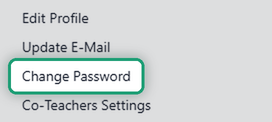
- Choose Change Password.
- Enter your current password, then your new password twice.
- Click Change Password. A message at the top of the screen confirms the change.
To get back to your work, click Activities in the left menu.
Still stuck? Email support@classwork.com. We’re happy to help.
Are you new to Classwork.com? Welcome!
Click here to start your 30 day risk-free PRO trial today.
Was this article helpful?
That’s Great!
Thank you for your feedback
Sorry! We couldn't be helpful
Thank you for your feedback
Feedback sent
We appreciate your effort and will try to fix the article