|
|
Adding a Co-Teacher to your Classwork.com Account (PRO Feature) |
Add a Co-Teacher to Your Account
With Co-Teachers, a colleague can open your Classwork.com account to view your work, or to work in it with you. You both need Classwork.com PRO, and they need their own Classwork.com account.
Invite a co-teacher
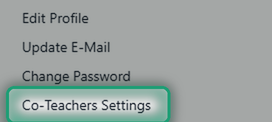
- Click Account at the bottom of the left menu, then Co-Teachers Settings.
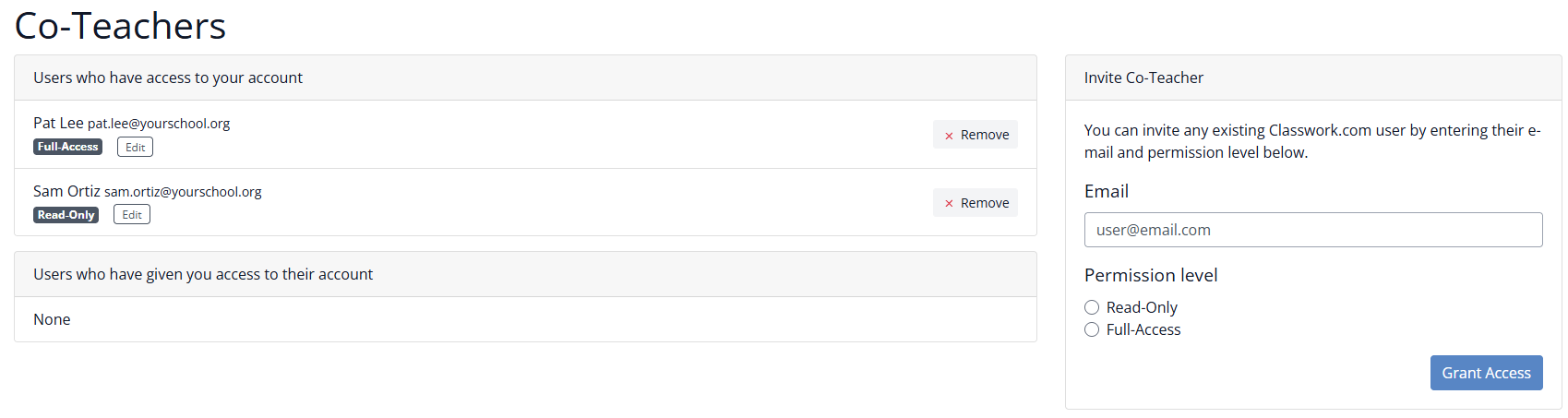
- Under Invite Co-Teacher, type their Classwork.com email.
- Choose a Permission level (below) and click Grant Access.
- Let them know: they sign in to their own account to accept.
Permission levels
- Read-Only: they can see everything in your account but can’t change anything. Good for sharing grades and student work with an intervention specialist or an administrator.
- Full-Access: they can do anything you can: edit scores, create Activities and assign work. Good for a co-teacher, a paraprofessional or a long-term substitute.
How it works
Your accounts aren’t merged. A co-teacher visits your account as a guest, and anything they do there is saved in your account. When they’re done, they switch back to their own.
Everyone you’ve invited is listed under Users who have access to your account, marked Pending until they accept. Accounts that others have shared with you are under Users who have given you access to their account.
Change or remove access
Click Edit next to someone’s permission to switch between Read-Only and Full-Access, or Remove to take their access away.
Was this article helpful?
That’s Great!
Thank you for your feedback
Sorry! We couldn't be helpful
Thank you for your feedback
Feedback sent
We appreciate your effort and will try to fix the article