|
|
Sharing Classwork.com Activities to Microsoft Teams |
Share Classwork.com Activities to Microsoft Teams
To share an Activity in Microsoft Teams, assign it with the Classwork.com delivery method, then post the Assignment link to Teams. Students open it right from Teams. Scores stay in Classwork.com.
Here’s how
- Create an Assignment from the Activity. On Create Assignment, choose Classwork.com as the delivery method and click Next.
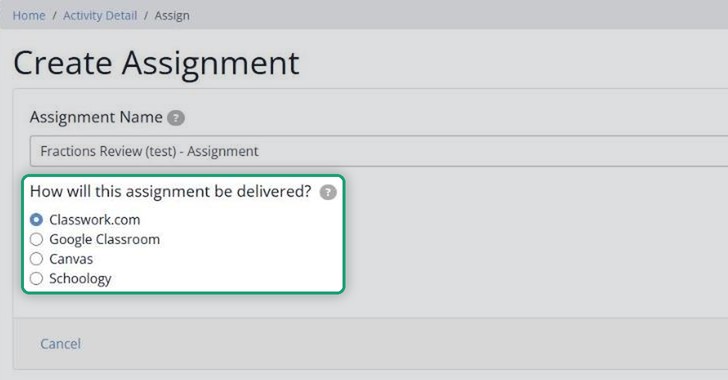
- Finish the remaining steps as usual and click Save.
- On the Assignment page, click Share to Microsoft Teams, below the assignment link.
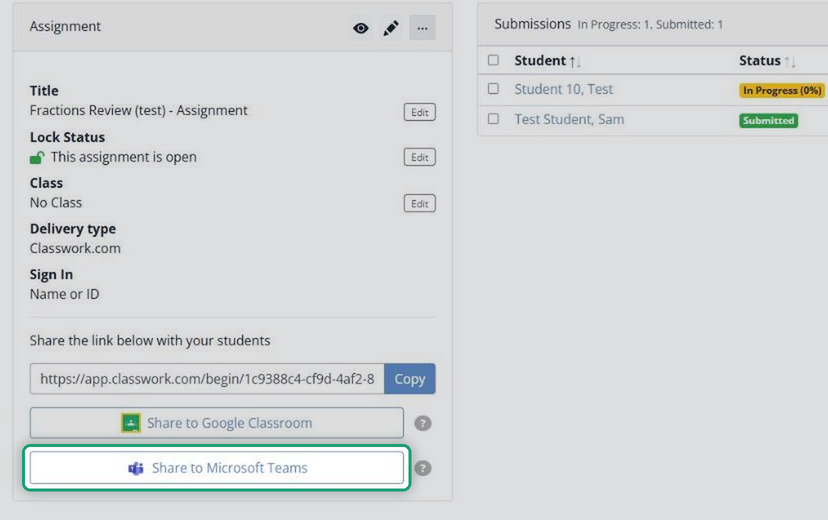
- Follow the prompts in Microsoft Teams to choose the class and post the assignment.
Grades and completion
Microsoft Teams doesn’t receive scores or completion data from Classwork.com. Review and score the work in Classwork.com. See How Do I Send Grades to Microsoft Teams?
Are you new to Classwork.com? Welcome!
Click here to start your 30 day risk-free PRO trial today.
Was this article helpful?
That’s Great!
Thank you for your feedback
Sorry! We couldn't be helpful
Thank you for your feedback
Feedback sent
We appreciate your effort and will try to fix the article