|
|
Sharing Classwork.com Activities to Microsoft Teams |
Classwork.com allows you to share your Assignments directly to Microsoft Teams for easy distribution to students.
Here’s how:
On Step 1 of creating an Assignment, select Classwork.com as the delivery method.
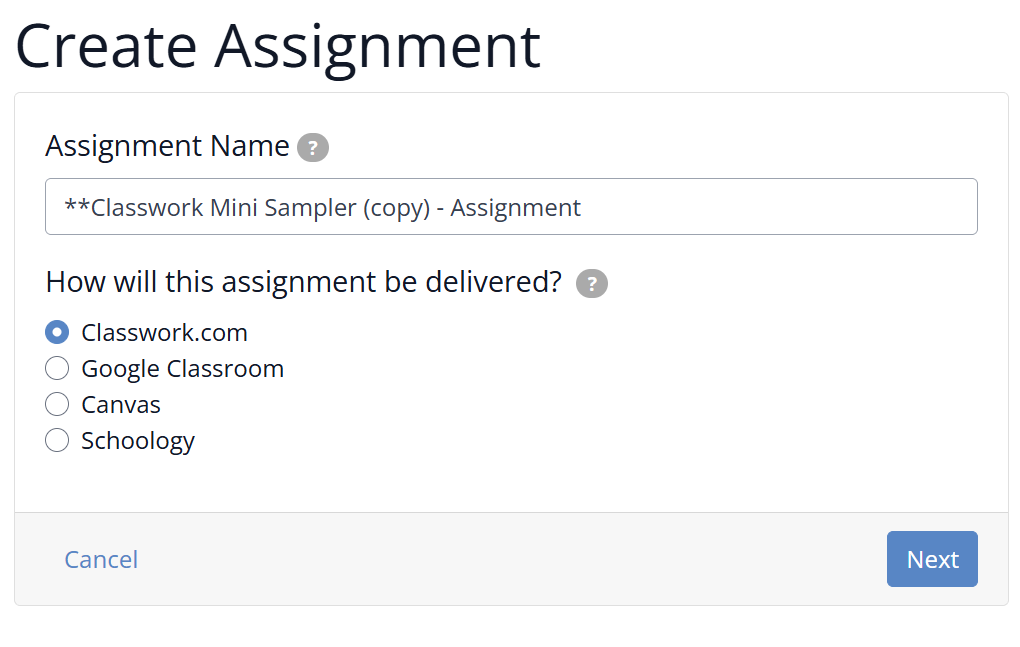
Complete the next three setup steps as usual.
On the Assignment Detail screen, you’ll see a Share to Microsoft Teams button on the bottom left side of the page.
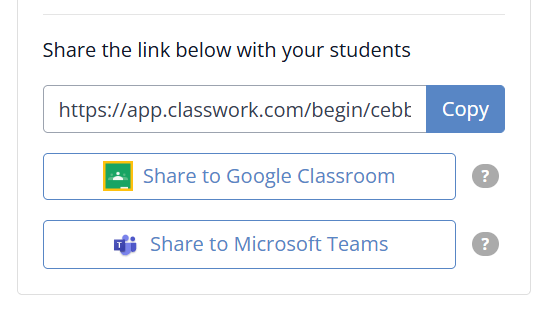
Click it and follow the on-screen prompts in Microsoft Teams to finish setting up your Assignment.
Once shared, students can access the Assignment link right from Microsoft Teams—no extra steps needed.
Are you new to Classwork.com? Welcome!
Click here to start your 30 day risk-free PRO trial today.
Was this article helpful?
That’s Great!
Thank you for your feedback
Sorry! We couldn't be helpful
Thank you for your feedback
Feedback sent
We appreciate your effort and will try to fix the article