|
|
Schoology: How do I Set up Classwork.com as an External Tool? |
Classwork.com can be easily set up for integration with Schoology by your Schoology administrator. Students will be able to access and complete Classwork.com Assignments without ever leaving Schoology, and scores will be automatically entered into the Schoology gradebook.
To get started, have your Schoology administrator contact us at support@classwork.com for help. Then send them a link to this article!
For security reasons, we will only deliver these credentials to your Schoology administrator for a one-time Organization-level setup.
These Instructions Are for Schoology Administrators Only
After you have obtained the consumer key and shared secret from support@classwork.com, follow these steps.
- Open Schoology and log in as an administrator.
- Select Tools from the top menu, then select School Management.

- Select Integration from the School Management menu, then choose the External Tools tab. Click the Add External Tool Provider button.

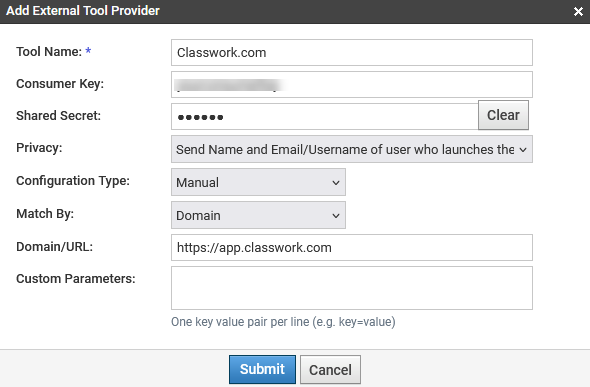
- In the dialog box that opens:
- Add the tool name (Classwork.com).
- Add the Consumer Key and Shared Secret in the highlighted fields.
- Select Send Name and Email/Username of user who launches the tool for privacy.
- Select Manual Configuration type.
- Match by: Domain.
- Add https://app.classwork.com for the domain/URL. Do not include a trailing slash – Schoology will fail to find the tool when a student tries to start an assignment.
- Select Submit.
- Add the tool name (Classwork.com).
Please note: the entries on your screen must match the screen below, or the tool will not work.
After this is complete, teachers will be able to add their Classwork.com Assignments to their courses with only a few clicks. They will not need the Consumer Key and Shared Secret in their course materials, since those are only for the initial admin-level setup – so do not share them with teachers!
Was this article helpful?
That’s Great!
Thank you for your feedback
Sorry! We couldn't be helpful
Thank you for your feedback
Feedback sent
We appreciate your effort and will try to fix the article